Registry
In DI-engine, in order to start a training task through config file convenientely, we recommend that you should utilize Registry mechanism to register those modules that are implemented by yourself.
For now, Registry supports these modules:
policy
env
model
reward_model
learner
buffer
serial_collector
parallel_collector
comm_learner
comm_collector
commander
league
player
Then we will take Policy to exemplify how to use Registry when you implement a new policy.
Add the
Registrydecorator for the new policy.
from ding.utils import POLICY_REGISTRY

@POLICY_REGISTRY.register('dqn')
class DQNPolicy(Policy):
    pass
In config file, list the name and file path of the new policy
In key
type,write the name of the policy。In key
import_names,write the file path.import_namesis asked to be alist, and each of its element is a python import abstract path(i.e. We can runimport name1.name2in Python Idle), such as:
ding.policy.dqn
dizoo.atari.envs.atari_envThe config file example is as follows:
create_config = dict(
    policy=dict(
        type='multi_head_dqn',
        import_names=['dizoo.common.policy.multi_head_dqn'],
    # ...
    )
)
If you carefully read the source code, you will find out that for polices implemented in DI-engine core code(in path ding/ding/), the
import_namesis not listed in config file. However, if you implement a new policy, it is a must to listimport_names.
Create the module through system functions
If you want to start the training task through DI-engine
serial_pipeline, for example, use CLIding -m XXX -c XXXX_config.py -s XX, or callserial_pipelinefunction. Step 3 can be ignored, becauseserial_pipelinehas already been done inserial_pipelinefunction. However, if you want to write your own pipeline, you can callcreate_policyfunction to create your policy.from ding.policy import create_policy cfg: dict dqn_policy = create_policy(cfg.policy)
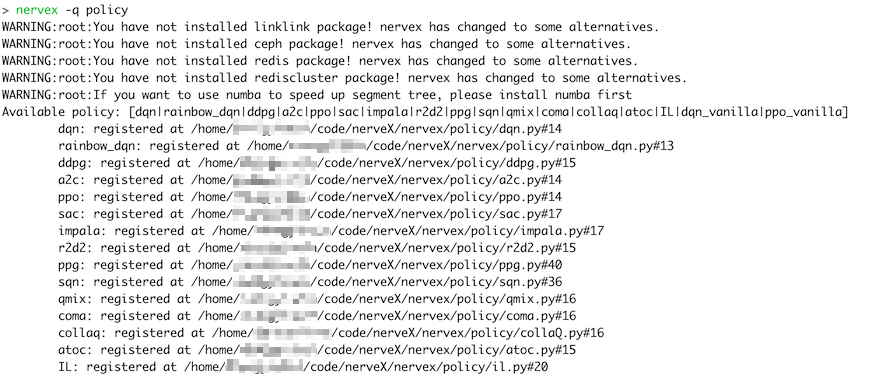
Besides, you can use CLI ding -q <registry name> to look up the modules that are already registered in DI-engine core code. For example: